Privacy & Safety
How your conversations and media stay private, what content is allowed, and how to report, block, and mute.
Privacy is the question people ask most, so here it is plainly.
Your conversations are private#
Your conversations — chats, sexting, girlfriend texts, calls — are tied to your account and are never shown publicly. Payments are handled discreetly through a secure processor, and the platform is built around keeping your activity to yourself.
Your creations are private by default#
- Characters you create stay private unless you publish them. Publishing goes through review — see Publishing & visibility.
- Images and videos you generate stay in your own gallery in Create unless you post them to the Feed or put them in a Collection.
- Posts can go to Everyone or just your Followers — set the default in Settings → Feed and change it per post.
- Worlds rooms are shared spaces: other players in the room see what you write there. See Playing a story.
Age requirement#
Xotic AI is strictly for adults — you must be 18 or older, and you confirm this before entering. Every character is AI-generated, fictional, and over 18.
Content rules#
Explicit adult content is a core, supported part of the platform, but some things are never allowed — most importantly anything involving minors or real people, and the other material in our policies. When a prompt or message crosses one of these lines, it's blocked and a message tells you so; prohibited content stays blocked regardless of wording. If you believe a block was made in error, contact support. The full policies:
- Community Guidelines
- Content Moderation Policy
- Prohibited Content Policy
- Safety Center
- Terms of Service
- Privacy Policy
Report, block, and mute#
You're in control of who and what you see:
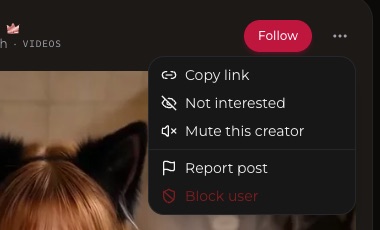
- Report — open the ⋯ menu on a post and choose Report post, or Report comment on a comment. In Worlds, open a player's profile and choose Report user. Reports are confidential and reviewed by our team.
- Block user — from a post's menu or a player's profile, to stop seeing them.
- Mute this creator — hide someone's posts from your feed without blocking them. Manage muted creators and tags in Settings → Feed.
- Hide adults-only posts — set Adults-only posts to Hide in Settings → Feed for a feed without explicit posts.
If your own content is hidden or removed, you'll get a notice under the bell explaining why. For anything urgent, contact support. More on community rules in Moderation & safety.